TRUSTED BY INDUSTRY LEADERS


A Canadian company building real-time software since 2013. 25,000+ apps have used Metered TURN.
01 — INFRASTRUCTURE
Global TURN network with automatic routing to the nearest server—or choose a specific region for data residency compliance.
No credit card required
Global Regions
31+
Worldwide coverage
Latency
<30ms
From anywhere
Edge PoPs
100+
Points of presence
TRUSTED BY INDUSTRY LEADERS
A Canadian company building real-time software since 2013. 25,000+ apps have used Metered TURN.
02 — API MANAGEMENT
Manage your TURN server infrastructure programmatically with our comprehensive REST API
Easily create or delete TURN credentials via REST API with auto-expiring options
Retrieve per-credential usage statistics and data consumption in gigabytes
Seamlessly enable or disable TURN credentials with a simple API call
Query precise usage statistics filtered by specific dates through our API
03 — GLOBAL NETWORK
Enterprise-grade infrastructure spanning 6 continents with automatic geo-routing to the nearest server
31+
Global Regions
6 continents covered
100+
Edge PoPs
Points of presence
<30ms
Global Latency
Typical worldwide
IETF STANDARDS COMPLIANT
Full conformance to WebRTC & TURN specifications
Supported transports:
Available on ports:
Bypass restrictive firewalls
04 — PERFORMANCE
High-performance, low-latency infrastructure for demanding real-time applications
05 — PRICING
Start free, scale as you grow
★ INCLUDED WITH EVERY TURN PLAN
Managed signalling for SDP and ICE exchange, with pub/sub channels and presence. Every plan's price includes a connection and message allowance, with no separate subscription; Growth, Business and Enterprise include progressively larger ones.
FREE TRIAL
$0/mo
No credit card required
GROWTH
$99/mo
BUSINESS
$199/mo
ENTERPRISE
$499/mo
REALTIME MESSAGING · INCLUDED WITH EVERY TURN PLAN
Concurrent connections and messages per month, included in the plan price.
| PLAN | CONCURRENT CONNECTIONS | MESSAGES / MONTH | OVER THE ALLOWANCE |
|---|---|---|---|
| FreeEvery account | 100 | 100k | Hard capNo overage charges |
| GrowthTURN 150 GB · $99/mo | 1,000 | 5M | $2.50 / million messages$0.01 / extra peak connection |
| BusinessTURN 500 GB · $199/mo | 5,000 | 25M | $2.50 / million messages$0.01 / extra peak connection |
| EnterpriseTURN 2 TB and up | 20,000 | 100M | $2.50 / million messages$0.01 / extra peak connection |
Paid-plan overage is drawn from your account balance and is on by default. Connection overage is charged once per billing period for each connection your peak concurrency reaches above the allowance. The allowance becomes a hard cap if you switch overage off in the dashboard, or if your balance runs out with auto-recharge off. The free tier is hard-capped. Limits and quotas
Need higher limits, or Realtime Messaging without a TURN plan?
CUSTOM PLAN
Tailored solutions for high-volume usage and enterprise needs.
06 — ADVANCED FEATURES
Enterprise-grade tools for multi-tenancy, automation, and white-label deployments
Create isolated environments for different customers, apps, or environments. Perfect for SaaS platforms reselling TURN or enterprises with multiple applications.
# Create a project with 50GB quota
curl -X POST \
  https://turn.metered.ca/api/v1/project \
  -H "Authorization: Bearer YOUR_API_KEY" \
  -d '{
    "projectName": "customer-acme",
    "quota": 50000000000,
    "quotaExceededAction": "notify"
  }'

# Get project usage
curl https://turn.metered.ca/api/v1/project/usage \
-H "Authorization: Bearer PROJECT_API_KEY"// Webhook payload at 80% quota
{
"event": "project_quota_80_percent",
"project": "proj_abc123",
"projectName": "customer-acme",
"quota": 500000000000,
"usage": 400000000000
}
// Verify HMAC-SHA256 signature
// Header: X-Metered-Signature-256
const isValid = verifySignature(
payload,
signature,
projectApiKey
);Receive real-time notifications when projects approach or exceed their quotas. Automate your billing and alerting workflows with secure, verified webhooks.
Use your own domain for TURN servers. White-label your infrastructure with a simple CNAME record while leveraging Metered's global network.
turn.yourcompany.com)
# Global routing (auto geo-routing)
CNAME  turn.example.com  →  global.relay.metered.ca

# Region-specific (data residency)
CNAME  turn-eu.example.com  →  eu.relay.metered.ca
CNAME  turn-us.example.com  →  us.relay.metered.ca
PROTOCOL SUPPORT
PRIVATE BACKBONE ARCHITECTURE
TURN servers interconnected via a dedicated high-speed private backbone. Cross-continent traffic routes through our network, not the public internet.
07 — FEATURES
Runs on standard ports for maximum compatibility
Tested to bypass most firewall rules including DPI
Enterprise grade reliability with proven track record
Secure connections through DPI firewalls
Unlimited STUN usage included free
Supports both TCP and UDP protocols
Automatic routing to nearest server
Add credentials and you're ready to go
Free STUN and pay-as-you-go TURN pricing
Separate usage by customer or app
Usage logs, threshold alerts, billing records
Handle any number of concurrent users
08 — USE CASES
Stream AI-generated audio and video responses with ultra-low latency for real-time AI interactions.
TURN for AI agentsEfficiently transfer data between IoT devices in real time with ultra-low latency.
Secure, high-performance real-time surveillance with TURN over TLS (TURNS).
Stream live content with minimal latency for real-time viewing experiences.
High-quality VoIP and video calling even in NAT-restricted environments.
Ultra-high-speed connections for 3D rendering, AR, and VR experiences.
Reliable, low-latency streaming for healthcare and telemedicine applications.
Efficient peer-to-peer data sharing using WebRTC DataChannels.
09 — WHY METERED
Trusted infrastructure since 2013
PREMIUM NETWORK
Metered has a global low latency network of TURN Servers across the globe that offer less than 30ms latency from anywhere and under 0.01% packet loss.


EXCEPTIONAL SERVICE
Our customer service team includes engineers and developers experienced in WebRTC who can handle your technical and non-technical requests quickly.
POWERFUL APIS
With Metered TURN Server's robust REST APIs, you gain full control of TURN Server management.

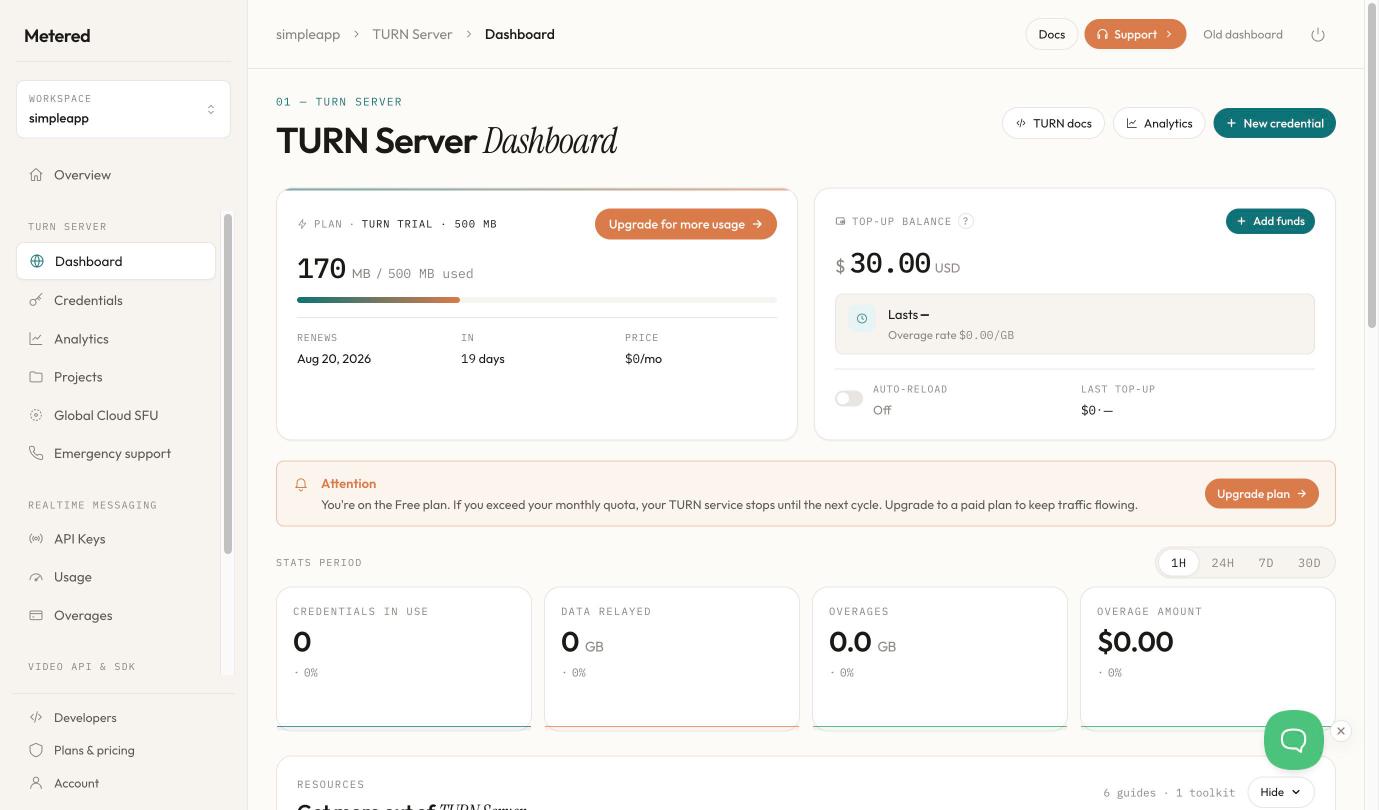
DASHBOARD & ANALYTICS
Use the Metered TURN Server dashboard to manage user credentials, view detailed usage stats and manage billing information.
10 — SIGNALLING
TURN Relay carries the media. Signalling establishes the session. One integration covers both halves of the job: getting your peers to find each other, and carrying the media once they do. Signalling is included with every TURN plan.
Every Metered TURN plan includes Realtime Messaging: a managed WebSocket layer that handles SDP and ICE exchange between peers. Session establishment is provisioned alongside the relay rather than procured separately.
WHAT YOU DON'T HAVE TO BUILD
Paid TURN plans carry a bundled Realtime Messaging (Signalling) allowance, and overages are available if you go over it. Accounts without a paid TURN plan use the free tier. See the allowance per plan
11 — CREDENTIAL MANAGEMENT
Credentials are created from your backend with an optional expiry and an optional label. Any credential can be disabled, re-enabled, deleted, or deleted in bulk by label.
01 · CREATE
Returns a username, a password, and a credential-scoped API key.
02 · LABEL
labelA free-text string on the credential. Filter the credential list by it, update it, or delete by it.
03 · EXPIRE
expiryInSecondsThe credential auto-disables when it elapses. No minimum, no maximum. Omit it and the credential does not expire.
04 · REVOKE
Delete by label removes every active credential carrying that label and returns the count.
KEY SCOPES
secretKey
ACCOUNT · SERVER-SIDE ONLY
Creates credentials, lists them, and manages projects and usage. Never exposed in front-end code.
apiKey
CREDENTIAL · FRONT-END SAFE
Issued with each credential. Works with one endpoint only — Get Credential, which returns that credential's ICE servers array.
projectApiKey
PROJECT · SERVER-SIDE
Stands in for the secret key on project endpoints. Can be regenerated, which invalidates the old one immediately.
GETTING IT TO YOUR APP
Expiring credentials. Your backend creates one,
gets back a username, password and a credential-scoped
apiKey,
and hands that key to the front end. The browser exchanges it for the ICE servers
array. When the deadline passes, the credential auto-disables.
Non-expiring credentials. Nothing needs re-creating, so the front end can hold the scoped key and fetch its ICE servers directly. Your secret key stays on the server either way.
From the dashboard. Every credential has a Show ICE Servers Array button that gives you the finished configuration to copy.
Every route returns the same complete array — STUN, plus TURN over UDP and TCP on ports 80 and 443, and TURNS over TLS.
curl -X POST \
  "$API/api/v1/turn/credential?secretKey=$SECRET" \
  -H "Content-Type: application/json" \
  -d '{
    "expiryInSeconds": 14400,
    "label": "customer-acme"
  }'

# Both fields are optional.
# Returns: username, password, apiKey
IN THE DASHBOARD
Listing credentials over the API is available on every plan, the free trial included.
12 — DATA RESIDENCY
By default, traffic routes to the server nearest each user. Or name a region: media for your German customers remains in Germany, media for your Canadian customers remains in Canada. One account, one integration.
Region control is applied at the credential level rather than the account level. Name a region when you request that credential's ICE servers and it relays through that region. Omit it and traffic routes to the nearest available edge automatically.
A single account can satisfy conflicting residency obligations concurrently — per tenant, without duplicate accounts, parallel environments or a forked integration to maintain.
Full region list and endpoints# Relay this credential from a named region
curl "$API/api/v1/turn/credentials?apiKey=$KEY®ion=eu"
# Omit it for the nearest server to the user
curl "$API/api/v1/turn/credentials?apiKey=$KEY"
# Both return the full ICE servers array.STATIC IP ALLOWLISTING
We publish the relay IP addresses for every region, as individual addresses and as ranges, so your network team opens exactly what your policy allows — no guesswork, and nothing opened on faith.
How much they open depends on how you route. Automatic geo-routing can place a session in any region, so the allowlist has to cover every region we operate. Pin a credential to a region and the list narrows to that region's addresses alone.
Available on every plan, the free trial included.
13 — THROUGHPUT
Metered does not impose a throughput limit on individual TURN allocations. Available bitrate is governed by the client's own connection.
4K video
A single 4K stream through the relay encounters no platform-imposed limit, and neither does a multi-track session carrying several of them concurrently.
Remote rendering
Remote-rendered frame buffers and AR/VR workloads are bandwidth-intensive by design. The relay is not the constraint on them.
AI video
Sessions carrying multiple tracks into an inference pipeline relay at whatever rate the client is able to sustain.
WHY THE COMMITMENT HOLDS
An uncapped allocation is only meaningful if the underlying network can carry it. Metered operates 100+ edge points of presence across 31+ regions.
100+
Edge PoPs
31+
Regions
0
Per-allocation caps
14 — COST CONTROL
Fund the account in advance. Relay usage draws down that balance and cannot exceed it, unless you set a threshold and an amount to top it up automatically.
PREPAID BALANCE
USAGE VISIBILITY
Attributing a given day's consumption to a specific customer is a single API call. Daily relay usage is available per credential for the preceding three months, with your own labels present on every record.
Set a threshold and a top-up amount, and the account keeps itself funded. Your relay runs continuously while the balance looks after itself.
The dashboard projects how long the current balance lasts at your present rate of consumption, so a top-up is a decision you make early rather than a surprise.
You set the ceiling; auto-recharge respects it. Your overage rate and every top-up are shown alongside the balance, so nothing about the bill is inferred.
15 — SUPPORT
Every paid plan includes emergency phone support. Dial in with your PIN and you're talking to the engineers who run the network.
Email support is for everything else, and it is available on every plan including the free trial — integration and configuration questions, credential and API behaviour, billing and payment queries, or anything else that needs a considered answer rather than an immediate one.
AVAILABILITY BY PLAN
Email support covers every plan and every kind of question. The free trial otherwise includes the paid feature set, global region access included, with emergency phone support the single exception. Both channels are staffed 24/7 by WebRTC engineers.
16 — ANALYTICS AND OBSERVABILITY
Relay traffic is only useful if you can attribute it. Usage breaks down by credential, project, country and transport — over windows from the last five minutes to the last ninety days.
GEOGRAPHY
Relay traffic by country, with client counts and share of total. Each row carries its own trend line over the selected window.
ATTRIBUTION
Credentials ranked by bytes, with share of total and a sparkline. The same breakdown exists per project, so a tenant's consumption is one glance away.
TRANSPORT
The split across UDP, TCP and TLS — so you can see how much of your traffic is traversing restrictive networks, and plan for it.
PEAK HOUR
A thirty-day heatmap plots session activity as day of week against hour of day. The busiest cell is named outright — the day, the hour, and the sessions it carried — and hovering any other cell reads back its own count.
The headline strip carries the same question in bytes: the single hour that relayed the most data in the selected window.
PEAK
The hour that relayed the most data in the window.
CREDENTIALS IN USE
Distinct credentials that actually relayed, not merely those issued.
PERIOD
Every figure carries the window it was measured over.
LIVE
The overview lists sessions from the last five minutes as they arrive, each with its type, the region that served it and how long it has been running. Confirmation that a deploy is relaying arrives in seconds, not at the next daily rollup.
TIME RANGE
Last hour, day, week, month or ninety days — each window compared against the preceding one of equal length, so a change in consumption is visible rather than inferred.
17 — INTEGRATION
Metered publishes full API reference documentation for your engineers, and machine-readable reference files so AI coding assistants generate integrations against current API behaviour rather than recalled training data.
Provide our TURN reference file to Claude Code, Cursor, GitHub Copilot, ChatGPT, GPT Codex or Windsurf and the assistant integrates Metered TURN into your application from current documentation.
OPENAPI SPECIFICATION
An OpenAPI specification is published alongside it: import it into Postman, generate a typed client in your language, or incorporate it into contract testing as part of your release process.
WHAT IS PUBLISHED
DEVELOPER RESOURCES
Comprehensive documentation, guides, and API references to integrate TURN servers into your application quickly.
Complete guide to configuring and using Metered TURN servers. Learn about global routing, region selection, and data residency.
Manage TURN credentials programmatically with our REST API. Complete reference with code samples in multiple languages.
Use automatic geo-routing to connect users to the nearest server, or pin traffic to a specific region for data residency and compliance.
Get started with the Metered TURN service. Learn how to create credentials, configure endpoints, and relay WebRTC traffic through NATs and firewalls.
Learn how to create, manage, and auto-expire TURN credentials. Set up authentication for your WebRTC applications.
Open-source example applications showing real-world TURN server integration. Built with HTML and JavaScript.
Our support team is available to help you integrate TURN servers into your application.
Enhance your applications with our enterprise-grade TURN server infrastructure. Start free today.
Get Started FreeRELIABILITY
99.999% availability means less than 26 seconds of downtime per month.
MONTHLY DOWNTIME COMPARISON
Multi-Cloud Architecture
Deployed across multiple cloud providers with automatic failover
Automatic Failover
Traffic reroutes instantly around any unhealthy node
Health Monitoring
24/7 automated health checks every 10 seconds
Zero-Downtime Updates
Rolling deployments with no service interruption
SUPPORT
Real engineers answering your questions 24 hours a day, 7 days a week
Phone
Direct line
Quick reply
Live Chat
Instant help
Real Engineers, Not Scripts
Our support team includes WebRTC specialists and developers who understand your technical challenges firsthand.
No Ticket Queues
Skip the endless back-and-forth. Get direct access to someone who can solve your problem immediately.
Dedicated Account Manager
Enterprise customers get a dedicated point of contact who knows your setup and can provide proactive guidance.
GLOBAL NETWORK
31+ regions with intelligent geo-routing and data residency controls
GDPR Compliant
Pin traffic to EU regions only. Data never leaves European servers.
HIPAA Compliant
Healthcare-compliant infrastructure with BAA available for enterprise.
Geo-Pinning
Lock traffic to specific countries or regions for data sovereignty requirements.
Smart Routing
Automatic connection to nearest server for lowest possible latency.
INFRASTRUCTURE
Private backbone linking global TURN servers for ultra-low-latency communication between continents
One unique advantage of our TURN infrastructure is a specialized high-speed backbone that links our global TURN servers. For example, if one user is in London and another in New York, each connects to their nearest TURN server. These TURN servers are then interconnected via our private, high-speed backbone—ensuring ultra-low-latency, high-throughput communication between continents.
NETWORK TOPOLOGY
Low latency media relayed via private backbone
Consistently lower latency for long-distance calls across continents
Stable performance even when public internet routes are congested
High reliability for mission-critical real-time applications
Whether you're running an international video conference, a collaborative AR/VR session, or a cross-continent multiplayer game, the specialized backbone ensures your users experience the smoothest, most responsive connection possible.
<15ms
Inter-PoP Latency
<0.01%
Packet Loss